Apple’s WWDC26 session on Reality Composer Pro 3 shows how seriously they’re taking the tooling side of visionOS. The new release is all about iterating spatial scenes much faster, with less Xcode, more visual workflows, and a surprising amount of AI.
Key New Capabilities
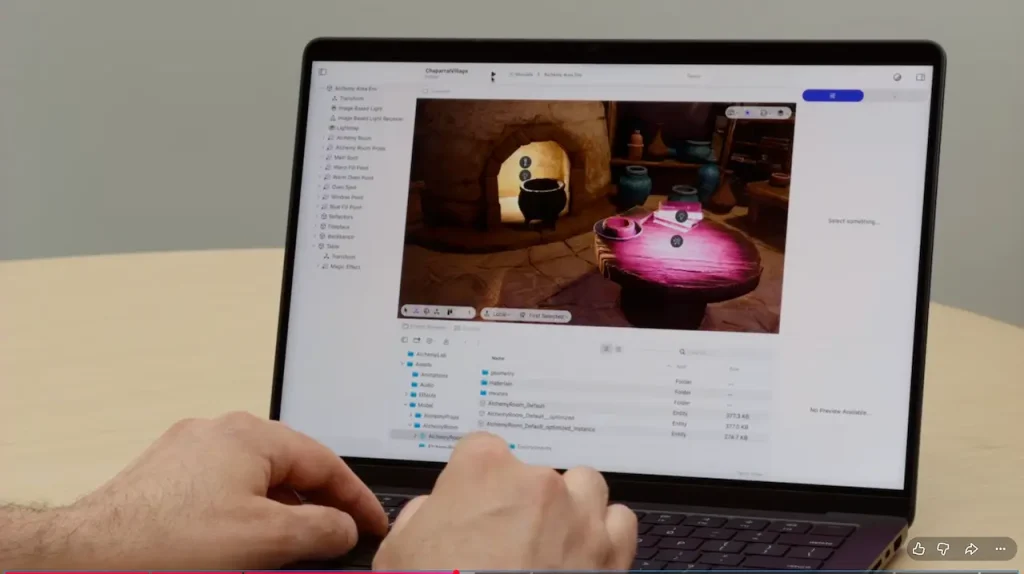
Reality Composer Pro 3 is now a standalone macOS app, downloadable from developer.apple.com, instead of being bundled only as an Xcode tool. The demo centers on a detailed “Chaparral Village” spatial game scene, and walks through several new pillars:
- Entities and components as the core model: Scenes are built from entities (objects in the hierarchy) that you compose with components (transform, lights, physics, audio, compute simulations, etc.). This reinforces a modular, ECS-like mental model that scales to complex worlds.
- Compute Simulation & Magic Graphs: A new Compute Simulation component can attach GPU-driven simulations (via node-based “compute graphs”) to entities. This makes particle systems and even fluid-like effects authorable visually, without hand-writing Metal compute kernels. It lowers the barrier to advanced VFX inside spatial apps.
- Prototypes and instances: Any entity can be turned into a reusable prototype and instantiated multiple times. Each instance can override specific properties (materials, lights, graphs, etc.), with the ability to reset or push overrides back to the source. This is effectively prefab-style authoring for visionOS, crucial for large scenes and teams.
- Live Preview on Vision Pro: Using launch controls, you can start a Live Preview session on a connected Apple Vision Pro. As you continue editing on the Mac, changes are reflected instantly in-headset. This “what you see is what you get” loop removes build/deploy friction and lets creators judge lighting, scale, and presence in a real spatial context.
- Lightmaps for baked indirect lighting: Reality Composer Pro 3 introduces a Lightmap component to precompute indirect lighting, ambient occlusion, and “beauty” maps. You can tune quality, preview Lightmap output before a full bake, and then bake the lighting for static scenes like the Alchemy Area. This brings traditional game-pipeline lighting optimization into the visionOS toolchain, improving realism while keeping runtime performance in check.
- Reality Composer Pro Assistant (AI tools): An integrated AI assistant can generate 3D objects and materials from natural language prompts (“add a few more items on the workbench”, “add some candles”). It also answers questions about using the tool itself. This is a big shift: content and guidance are both now AI-assisted, right inside the editor.
Why This Matters for Developers and Teams
Technically, Reality Composer Pro 3 smooths over some of the hardest parts of spatial development:
- You spend less time in boilerplate Xcode setup and more time inside a purpose-built scene editor.
- Complex effects like particles and fluid-like motion become accessible through node graphs, democratizing GPU simulation.
- Prototypes and instances make it realistic to maintain large, consistent worlds without manual duplication and brittle hierarchies.
- Live Preview plus Lightmaps align visionOS production with modern game-dev practices: author visually, iterate on-device, then bake for performance.
- The AI Assistant shortens the “blank canvas” and asset-sourcing problem by letting you experiment quickly with generated 3D props and materials.
In practical terms, this means teams can validate ideas on Vision Pro much earlier, iterate on feel and lighting in hours instead of days, and prototype ambitious spatial experiences without a full team of engine specialists. For the visionOS ecosystem, Reality Composer Pro 3 is less about a single flashy feature and more about raising the ceiling—and lowering the floor—for what developers can realistically build and ship.